-
github action으로 jekyll 빌드와 배포 하기설치&설정 관련 2024. 6. 12. 16:11728x90
github action으로 jekyll 빌드와 배포 하기
다음의 단계로 배포 처리를 합니다.

설정 > 개인 토큰 발급

- 프로필 사진을 클릭 후 Settings 선택
- 아래 메뉴에 Developer settings 선택
- Personal access tokens 선택
- Create New tokens 선택 후 tokens (classic) 선택
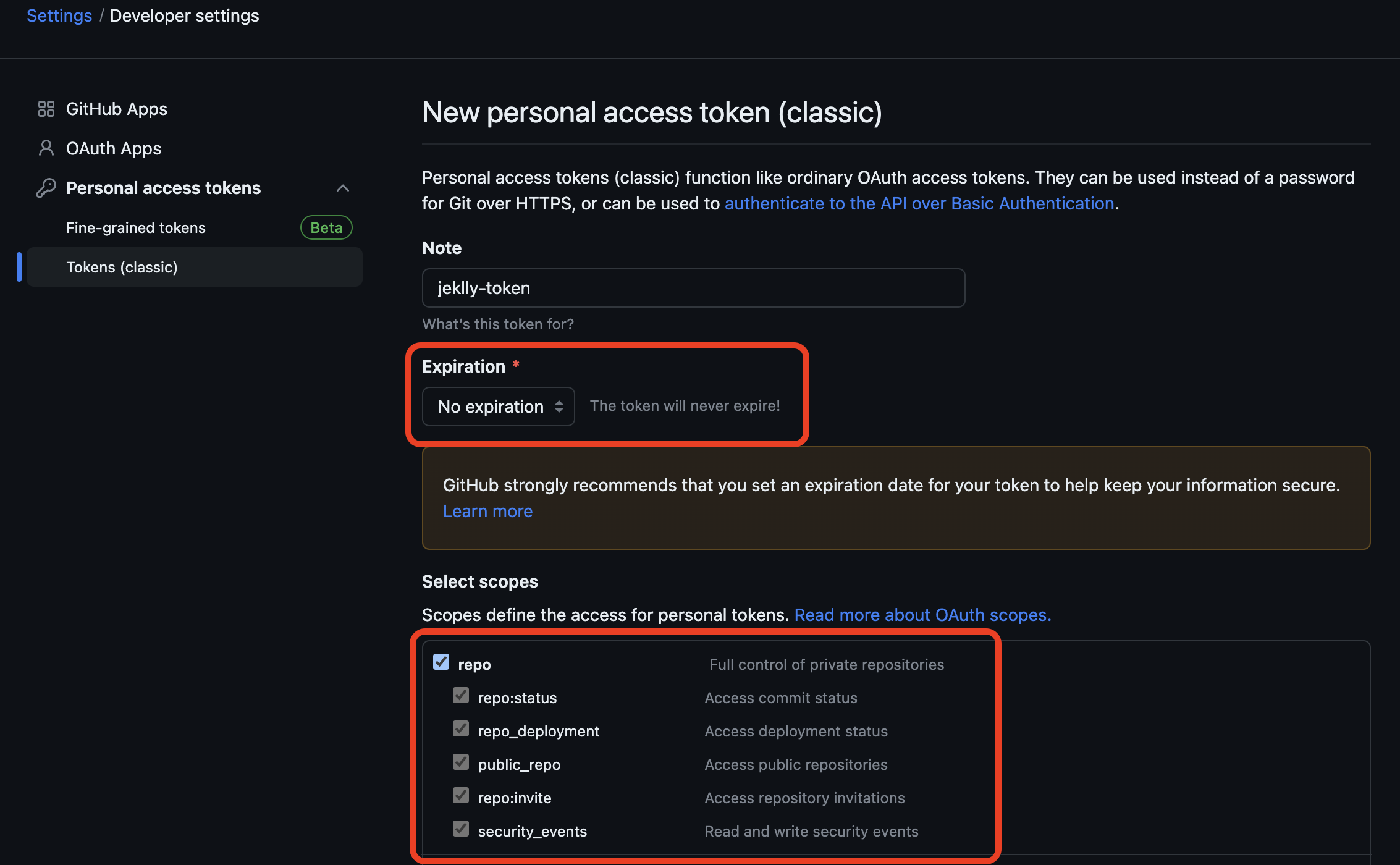
- 이름을 설정하고, Expiration을 No Expiration으로 설정
- 만료일을 설정 시 추후 변경 필요함
- Select scopes에서 repo 선택
- repository에 읽고 쓰고 등의 처리를 위해 필요
- Generated Token 버튼 클릭으로 토큰 생성

- 토큰 복사
- 토큰 값은 다시 확인이 불가하니 꼭 잘 저장 해야 함
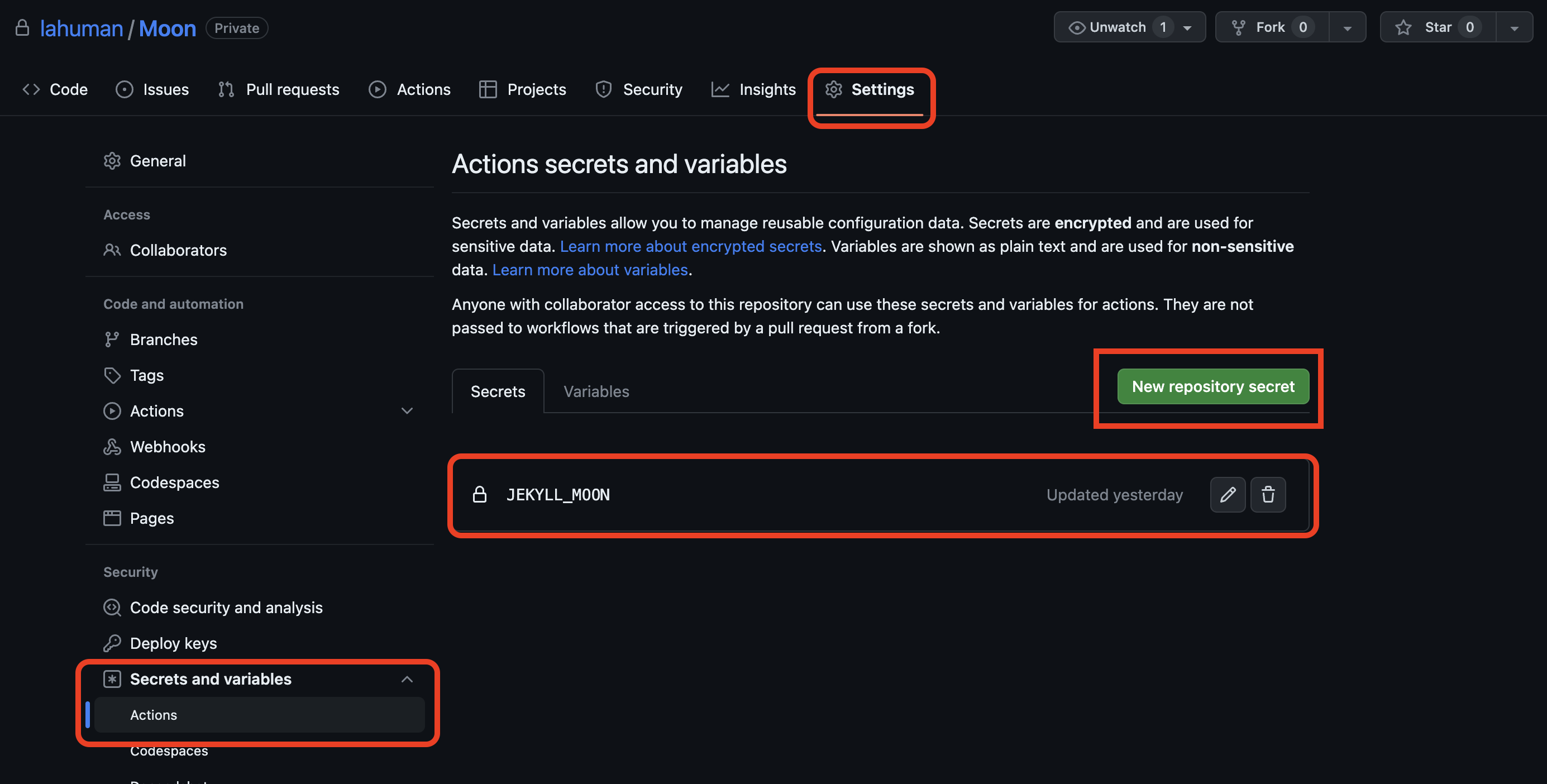
- 원천 소스가 되는 Repository로 이동
- Secrets and variables 선택
- Secrets 탭에 New Repository Secret 선택
- Name을 JEKYLL_MOON로 만들고 Secret에 생성된 토큰 값을 붙여 넣음

- root에 .github/workflows 디렉토리를 생성후 jekyll_build-and_push.yml 파일을 생성
name: Jekyll build and deploy

on:
  push:
    branches:
      - master

jobs:
  build_and_deploy:
    runs-on: ubuntu-latest

    steps:
    - name: Checkout source repository
      uses: actions/checkout@v2

    - name: Set up Node
      uses: actions/setup-node@v3
      with:
        node-version: 16.14.2

    - name: Set up Ruby
      uses: ruby/setup-ruby@v1
      with:
        ruby-version: 2.7 # 3.x 로 설정시 오류 발생하여 2.7로 고정

    - name: Cache Ruby gems
      uses: actions/cache@v2
      with:
        path: vendor/bundle
        key: $-gems-$
        restore-keys: |
          $-gems-
    - name: Install dependencies
      run: |
        bundle config path vendor/bundle
        bundle install --jobs 4 --retry 3
    - name: Build Jekyll site
      run: bundle exec jekyll build

    - name: Deploy to target repository
      uses: peaceiris/actions-gh-pages@v3
      with:
        personal_token: $ # 생성한 token 정보 설정
        publish_dir: ./_site
        user_name: 'github-actions[bot]'
        user_email: 'github-actions[bot]@users.noreply.github.com'
        publish_branch: master # 대상 repository branch 정보
        external_repository: 'lahuman/lahuman.github.io' # 대상 repository
파일 저장이 완료 되면 아래와 같이 github action이 실행됩니다.

2017년부터 운영 중이던 github 블로그의 빌드와 배포를 github action을 이용해서 처리 했습니다.
알고 있었는데, 시도하는게 어려웠습니다.
오늘은 뒤로 후퇴하는게 아닌 앞으로 한 걸음 내딛었다고 생각되네요.
참고자료
728x90'설치&설정 관련' 카테고리의 다른 글
Swagger JSON 파일을 html로 변환 하기 (0) 2024.06.14 Module not found: Can't resolve 'encoding' (0) 2024.06.12 AWS의 CodePipeline 에서 SonarQube 사용하기 (0) 2023.05.28 AWS PRESIGNED-URL 생성시 태그 추가 (0) 2022.12.19 Nginx를 통한 PROXY 통신시 간혈적인 502 오류 발생 (0) 2022.12.14